Home / AI label generator
The free AI label generator that gives you an editable label
Describe what you sell and get a complete label on a canvas in about fifteen seconds: layout, type, colour and your own copy. Not a flat picture with the words baked into the pixels, but a real design where every element is still yours to move, recolour and print.
- 1 label free right now, no account, no card
- 7-day Pro trial on sign-up, 15 a day, still no card
- then 3 a month, free, forever
What it makes
Every label below is the unedited output of the prompt printed beneath it, at the size shown. Nothing here was touched up afterwards.
- Pattern background
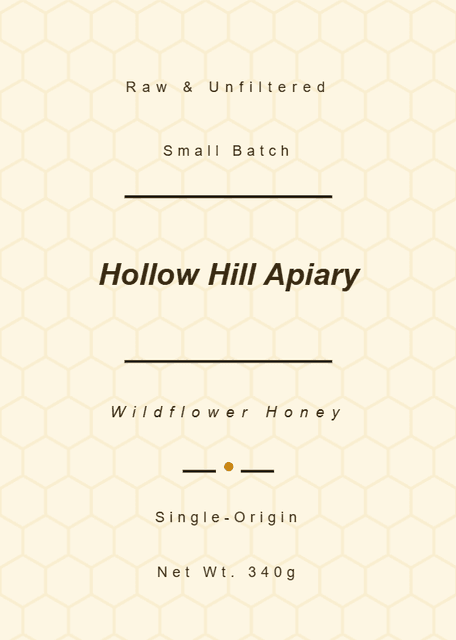
“Wildflower honey for brand "Hollow Hill Apiary", cream label with a honeycomb pattern background in soft amber, warm and traditional”
- Your colours, your copy
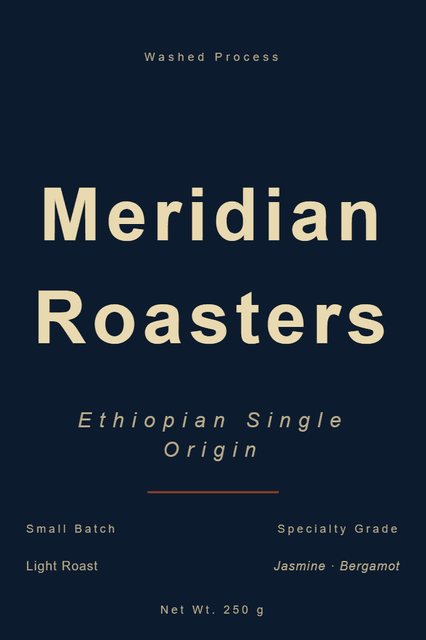
“Single-origin Ethiopian coffee for "Meridian Roasters", in deep navy and brass, modern premium, tasting notes jasmine and bergamot”
- Gradient background
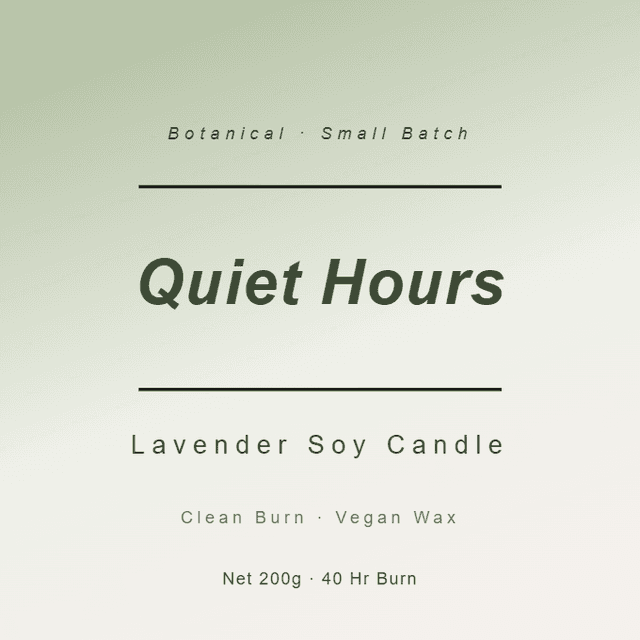
“Lavender soy candle for "Quiet Hours", calm and botanical, soft sage-to-cream gradient background, 40 hour burn time”
- Borders and badge styling
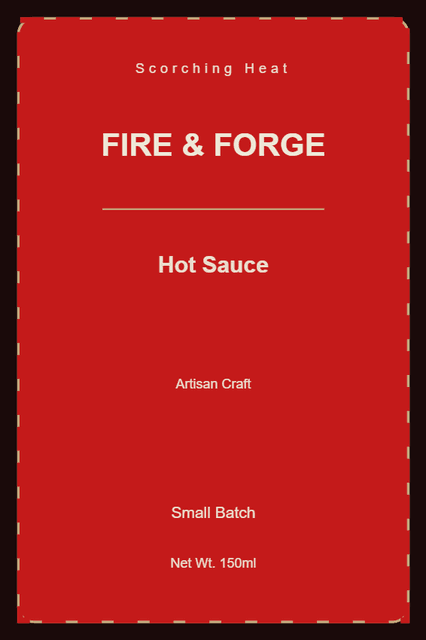
“Artisan hot sauce for "Fire & Forge", vintage badge style with a thin dashed border, scorching red and black”
- Any size you name
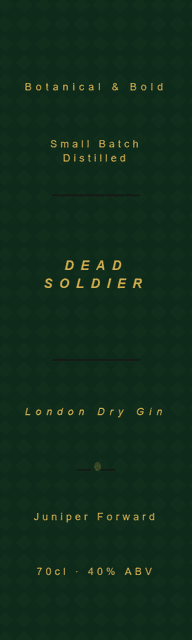
“London Dry gin for "Dead Soldier", tall narrow bottle-neck label, botanical and confident, deep green and gold”
- Die-cut shapes
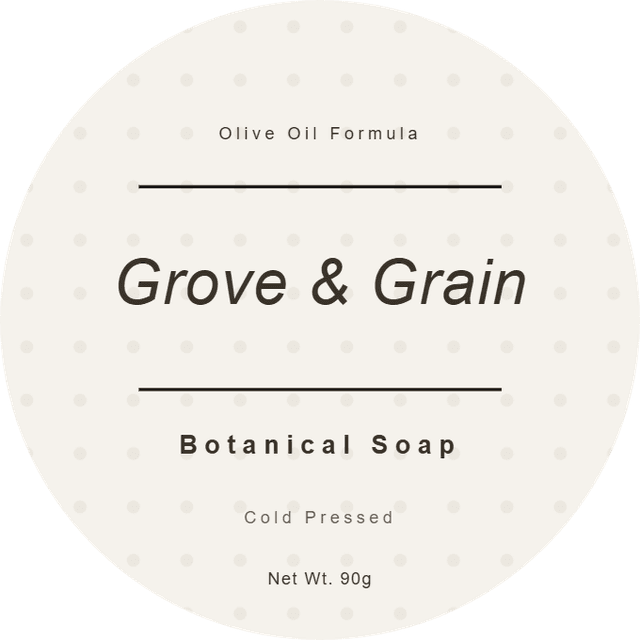
“Botanical olive oil soap for "Grove & Grain", round label, clean and airy, subtle dot grid background”
- Wide formats
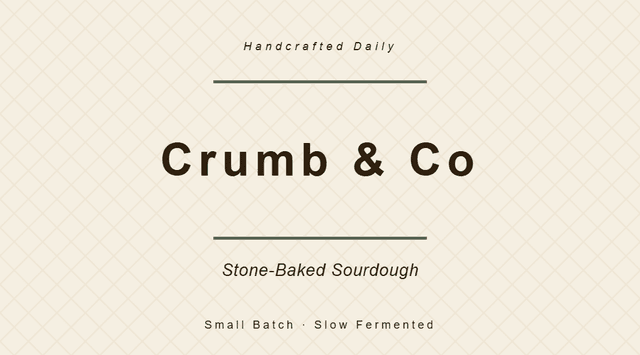
“Sourdough bakery label for "Crumb & Co", wide format, rustic and hand-made, stone-baked daily”
- Restraint, when you ask for it
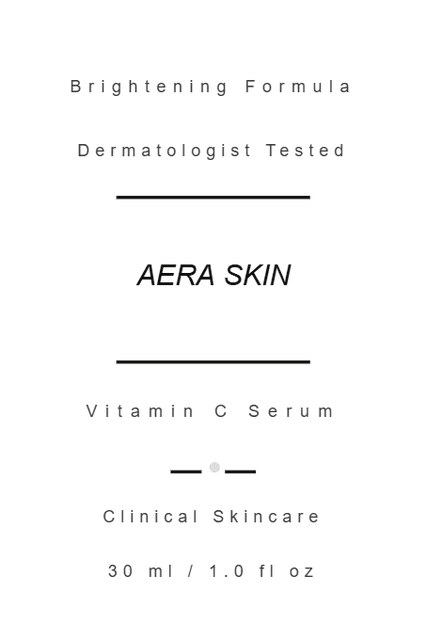
“Vitamin C face serum for "Aera Skin", clinical and minimal, black on white, 30 ml, dermatologist tested”
How to write a prompt that gets a good label
Most disappointing AI labels come from a three-word prompt. These are the levers that actually change the result, in the order they matter.
Name the product, not the category
The single biggest difference between a generic result and a good one. A category gives it nothing to work with; a specific product gives it a story.
weak:   a coffee label
strong: single-origin Ethiopian coffee, washed process, light roast, 250 g
Give the brand a name and one line of character
It will invent a name if you do not, and invented names repeat. One clause about what the brand stands for changes the typography and the palette.
for "Meridian Roasters", a roaster that treats single origins like vintagesSay the mood in two or three words
Modern premium, rustic and hand-made, clinical and minimal, botanical and calm. This is what selects the typeface pairing and the restraint level.
clinical and minimal, black on whiteName your colours
Plain colour words work. Ask for them and they are used, including on the background.
deep navy and brassInclude the copy that must appear
Net weight, volume, ABV, tasting notes, "caffeine free", a batch line. Anything you state gets set as real, editable text rather than invented.
tasting notes jasmine and bergamot, net wt 250 gAsk for one background treatment, not four
A pattern or a gradient or a border. Asking for everything at once is how labels end up looking cluttered, and one deliberate move reads as design.
a honeycomb pattern background in soft amberTwo things not to bother with: telling it where to put elements, which it will not honour because it works by adapting a layout rather than inventing one, and asking for a photograph or a custom illustration, which it does not produce. Both are a few seconds of work in the editor afterwards.
Why AI labels usually look generic
Because most tools are image generators pointed at a label-shaped canvas. They draw a picture of a label, which means the text is pixels: misspelled words you cannot correct, a typeface you cannot change, and no way to set the physical size for print. The result looks plausible in a browser and falls apart the moment you need to sell something with it.
This works the other way round. The AI arranges a real document using professionally drawn layouts, licensed fonts and a contrast check that runs on every generation, then hands it to an editor. That is also why it will not invent a wild bespoke illustration for you: it is building something printable rather than something impressive on a screen.
Printing it
Generate at the size you actually need, in millimetres, including awkward ones like a 30 × 100 mm bottle neck. When you are ready, arrange the label onto a standard sheet and preview the exact physical layout before you print. There are guides for Avery 5160, OnlineLabels OL150 and every other sheet we support.
Questions
Can AI create labels?
Yes. Describe the product, the brand and the mood, and you get a finished label on a canvas: layout, typography, colours and the copy you asked for. The important part is what happens next. Here the result is a real editable design, so you can change any word, colour or element afterwards, rather than a flat picture you have to accept or discard.
Is there a free AI label creator available?
This one. You get 1 label with no account at all, and no card. Creating an account starts a 7-day Pro trial with 15 generations a day, again with no card, and when that ends a free account keeps 3 generations a month.
How to make an AI label?
Write one or two sentences naming the product, the brand, the mood and any copy that must appear, pick the physical size, and generate. The design opens in the editor where you can adjust anything, then export a print-ready file.
Which AI is best for making labels?
The honest answer is that it depends on whether you need to edit the result. General image generators make a picture of a label, where the text is baked into pixels and often misspelled. A label tool gives you a document: real text, real fonts, real measurements in millimetres. If you intend to print onto a specific sheet, you want the second kind.
How can I make printable labels for free?
Generate or design your label at the physical size you need, then export. The editor and the layout tools are free, and you can arrange your label onto a standard sheet and preview the exact layout before printing.
Can I use AI-generated labels commercially?
Yes, on your own products. The designs are built from our own template layouts, licensed fonts and open-license graphics, so there is no third-party image licence to clear. Check the trademark position on any brand name you invent before you commit it to a print run, exactly as you would with a designer.
Will it use my brand colours and my exact wording?
Name them in the prompt and they are used. Ask for deep navy and brass and you get deep navy and brass; give it your net weight, ABV or tasting notes and they appear as real text. If you have a Brand Kit saved, you can point a generation at it, though that is something you choose rather than something applied behind your back.
What can it not do?
It does not generate artwork or photography: illustrations and icons come from open-license libraries, so a fully bespoke illustration is not on the table. It also cannot be told where to put things ("put the name at the top" will not move it), because it works by adapting one of our layouts rather than inventing one. Position anything you like yourself in the editor afterwards, in seconds.
Weighing it against something else? We wrote an honest comparison with Canva, including the parts where Canva wins.
One label, free, no account. Scroll back up and describe what you sell.
Or start from a template instead